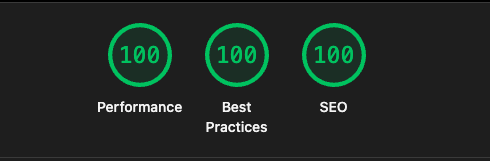
Achieving a 100/100/100 Lighthouse Score for Qlease.pl
•
16 min read
LighthouseNext.jsWeb PerformanceAccessibilitySEOCase Study
Google Lighthouse is an open-source auditing tool that grades web experiences across performance,
accessibility, best practices, and SEO. Reaching 100 in a single category is
tough; sustaining perfect scores across all four requires tuning every layer of
the stack and resisting regressions over time (developer.chrome.com). While plenty of teams treat Lighthouse as a checklist exercise, we looked at
it as a product quality proxy. This case study walks through how we partnered
with Qlease.pl to do exactly that, covering the technology
choices, optimization tactics, real code, obstacles, and the lessons that helped
us deliver a consistently perfect audit.
Project Overview
Qlease helps drivers compare leasing offers, configure cars, and request quotes in seconds. In a market where the first fast, easy experience wins the lead, we treated speed and usability as core product features rather than polish.
Tech stack highlights
Next.js 13 App Router for server components, streaming, and fine-grained caching. We leaned on the flexibility of the App Router to render different slices of the UI either statically or dynamically without shipping more JavaScript than necessary.
TypeScript everywhere to prevent regressions while refactoring aggressively. The strong typing was invaluable when moving logic between server components, server actions, and shared utilities.
Vercel hosting with a global edge network, HTTP/2, and built-in image optimization. Using Vercel gave us SSL, Brotli compression, and CDN caching out of the box.
Prisma + PostgreSQL for statically typed data access and efficient queries. Prisma’s generated types reduced runtime surprises while the database layer was tuned with proper indexes and caching to guarantee low-latency reads.
Material UI as a design system to accelerate build-out. We combined the component library with custom tokens, CSS variables, and tree shaking so the bundle only shipped what the pages actually used.
Next.js server actions + Resend to keep form submissions server-side and script-free. Resend acted as the transactional email provider without bloating the front-end with third-party SDKs.
With the foundation in place we optimized each Lighthouse axis individually while watching how changes influenced the others.
Performance Optimization (100/100)
Performance was the primary driver behind the engagement metrics Qlease cared about. We targeted five core metrics—First Contentful Paint (FCP), Largest Contentful Paint (LCP), Total Blocking Time (TBT), Speed Index, and Cumulative Layout Shift (CLS)—and iterated until each was comfortably within the Lighthouse 100 band.
Pre-render wherever possible
Generated landing pages statically and cached them at the edge with ISR for freshness.
Marked dynamic routes as force-static or revalidate with realistic budgets.
Inlined above-the-fold data through server components so the client received ready-to-render HTML.
Shifted complex filtering into Prisma, returning ready-to-render DTOs.
Cached expensive lookups with the App Router cache() helper to eliminate duplicate queries.
Avoided over-fetching by splitting queries into getModelSummary, getOffers, and getFaq.
Added database-level indexes on frequently filtered columns such as make, model, and monthlyPrice. That dropped our slow-query log volume to near zero and cut median query time from ~38 ms to ~8 ms.
Used Prisma's include and select options to send only the fields needed for the UI, saving roughly 9 KB per JSON response.
Pipelined batched reads with Promise.all only when the data truly could not be cached individually.
Optimize the critical path
Replaced blocking hero artwork with Next.js Image components using AVIF/WebP and intrinsics.
Deferred secondary scripts (analytics, chat) with async and runtime toggles.
Collapsed FAQs and secondary tabs until the user interacts, saving initial DOM cost.
Inlined critical CSS via the App Router generateStaticParams and a minimal design token sheet so the first paint required zero render-blocking stylesheets.
Wrapped expensive client components with dynamic(() => import(...), { ssr: false }) when hydration was optional, shaving 24 KB from the main bundle.
Audited third-party scripts monthly; anything over 10 KB compressed or with questionable ROI was either lazy-loaded behind user intent or replaced with a first-party implementation.
Prevent regressions with automation
Added a dedicated Lighthouse CI pipeline that runs against the production build on every PR.
Captured lighthouse-ci/assertions.json artifacts; failing thresholds blocked merges that would push us under 100.
Monitored Core Web Vitals from real users via Vercel Analytics to catch issues synthetic tests might miss.
Accessibility Upgrades (100/100)
Audited every interactive component to ensure focus order, visible focus, and ARIA labelling.
Paired text and background combinations with a contrast checker built into our design tokens.
Replaced icon-only actions with <button aria-label="Open leasing calculator"> patterns.
Reviewed color palettes against WCAG 2.1 AA contrast ratios, adjusting neutrals and accent hues until everything cleared 4.5:1.
Validated forms with inline error messaging, aria-live="polite" regions, and logical grouping for assistive tech.
Ensured the leasing calculator’s slider controls exposed keyboard and screen-reader hints for incremental adjustments.
Accessibility improvements consistently boosted engagement and contributed to SEO wins through richer semantics.
Best Practices Wins (100/100)
Adopted rel="noopener noreferrer" for outbound links and stripped unused third-party scripts.
Ran bundle analysis on each release to keep the main chunk under 80 KB compressed.
Monitored console warnings in CI so no regression slips into production.
Deferred non-essential cookies and localStorage writes until user interaction to avoid violating user privacy expectations.
Leveraged Content Security Policy headers to whitelist only the domains truly required by the app.
SEO Enhancements (100/100)
Produced lean, descriptive metadata per page (title, description, JSON-LD schema).
Structured car-detail content with FAQ schema and kept answers server-rendered for crawlability.
Generated clean URLs (/leasing/audi/q5) and maintained canonical tags to prevent duplication.
Minimized render-blocking CSS so Largest Contentful Paint stayed consistently under 1 s on mid-range hardware.
Added structured data for breadcrumbs, product offers, and FAQs using schema.org to surface rich results.
Introduced localized metadata for Polish and English locales so search engines could serve the right variant.
Minimized cumulative layout shift by reserving space for Image components, improving both UX and Lighthouse’s CLS metric.
Leveraged the App Router’s revalidateTag to refresh high-value pages (like seasonal campaigns) without sacrificing cacheability.
Handling Real-World Challenges
Audit variance: Lighthouse can fluctuate between 98-100 depending on device and throttling. We overshot budgets (e.g., keeping LCP < 1.8 s when the threshold is 2.5 s) to make 100 resilient, not lucky.
SEO vs. performance tension: Rich content like FAQs and tables is great for search but heavy for performance. Folding sections and lazy-loading illustrative media let us keep both.
Script discipline: Every script must justify its weight. When a marketing vendor could not meet our size budget we built lean, in-house replacements.
Data freshness vs. caching: Leasing data changes frequently. We balanced ISR with revalidateTag triggers from our back-office CMS so updates hit production within minutes without fully dynamic rendering.
MUI theming overhead: The default Material UI setup can add noticeable bundle weight. We trimmed unused variants, extracted shared tokens, and leaned on CSS variables to keep styling cheap.
Server Actions in Production
Moving form submissions to server actions removed client bundles and avoided API boilerplate.
Doing work server-side eliminated the need for extra API routes, cut JavaScript from the client, and improved Time to Interactive.
Key Takeaways
Frameworks set the floor. Next.js and Vercel provide strong defaults, so invest time in understanding and tuning them instead of rebuilding the basics. Features like incremental static regeneration, edge functions, and the Image component gave us free wins we simply had to configure well.
Every millisecond counts. Perfect scores demand relentless attention to tiny details: unused CSS, missing alt text, or a synchronous script can drop you to 99.
Performance is cross-functional. Design, content, backend, and frontend teams all own part of the scorecard.
Automate the guardrails. Lighthouse CI, bundle size limits, and Core Web Vitals tracking alert us the moment regressions land, keeping the score stable release after release.
User intent first. The numbers matter because they reflect real humans. Every optimization passed the “does this help the driver find the right leasing deal faster?” test before it shipped.
Conclusion
Perfect Lighthouse scores are not a vanity metric; they reflect fast, inclusive, and trustworthy experiences. By aligning product goals with performance work, leveraging the strengths of the modern Next.js stack, and iterating relentlessly, Qlease.pl delivers instant responses, accessible journeys, and search visibility that continue to drive leads. The journey to 100/100/100 is demanding, but the process of getting there builds a better product for every user.